

One traffic pool. One global price.
The EDIS Global Traffic Pool gives every VPS in your account access to one shared traffic reserve. Purchase traffic once and assign it to any VPS whenever you need additional traffic. Traffic that remains in your Pool does not expire. In the portal, use the +100 GB, +500 GB, +1 TB, or +10 TB quick buttons to assign traffic manually. Alternatively, enable Auto-Hydration for an individual VPS and select a 100 GB, 200 GB, 300 GB, or 500 GB increment. Each time the VPS reaches 99% of its current traffic allowance, Auto-Hydration assigns the selected increment from the shared Traffic Pool. 🌍 No traffic zones. One global price across all 50 EDIS locations.Plan Traffic and Pool Traffic explained
Only assign the amount a VPS is likely to use before its next monthly refill. Keeping the remainder in your Pool preserves it for future use.
Why use the Traffic Pool?
- ✅ Keep unused traffic in a shared, non-expiring reserve.
- ✅ Assign traffic to any KVM VPS in your account.
- ✅ Use one global price across all EDIS locations.
- ✅ Enable Auto-Hydration individually for each VPS.
- ✅ Cover temporary traffic peaks without changing your VPS plan permanently.
- ✅ Purchase 1 TB for EUR 6, with volume pricing available down to EUR 4.49 per TB.
Traffic Pool starter credit
Every newly purchased VPS adds 100 GB of complimentary traffic to your Traffic Pool account. The starter credit provides a safety reserve and lets you try manual assignment or Auto-Hydration before purchasing additional Pool Traffic. Your 100 GB starter credit:- ✅ Never expires while stored in your Traffic Pool.
- ✅ Can be assigned to any VPS in your account.
- ✅ Works with manual assignment and Auto-Hydration.
- ✅ Can be combined with purchased Pool Traffic.
How to use the EDIS Traffic Pool
1. Purchase traffic
Select the amount you need, from 1 TB to 10 PB. Larger bundles provide a lower price per TB. Purchased traffic is added to your shared Pool and does not expire while it remains there.2. Assign Pool Traffic
Open the Traffic Information window for the VPS and click +100 GB, +500 GB, +1 TB, or +10 TB. EDIS Global immediately deducts the assigned amount from your Pool balance and adds it to the current traffic allowance for that VPS.3. Enable Auto-Hydration
Enable Auto-Hydration for an individual VPS and select an increment of 100 GB, 200 GB, 300 GB, or 500 GB. When the VPS reaches 99% of its current allowance, Auto-Hydration assigns the selected amount from your Traffic Pool. The current allowance includes monthly Plan Traffic plus any Pool Traffic already assigned during the cycle.Auto-Hydration uses your existing Traffic Pool balance. It does not automatically purchase additional traffic. If the Pool balance is insufficient, you can’t assign further traffic until you top up the Pool.
Traffic Pool in the Traffic Information window
The Traffic Information window answers two questions: how much traffic this VPS can still use during the current cycle, and how to assign additional traffic from your shared Pool.Traffic usage and monthly refill
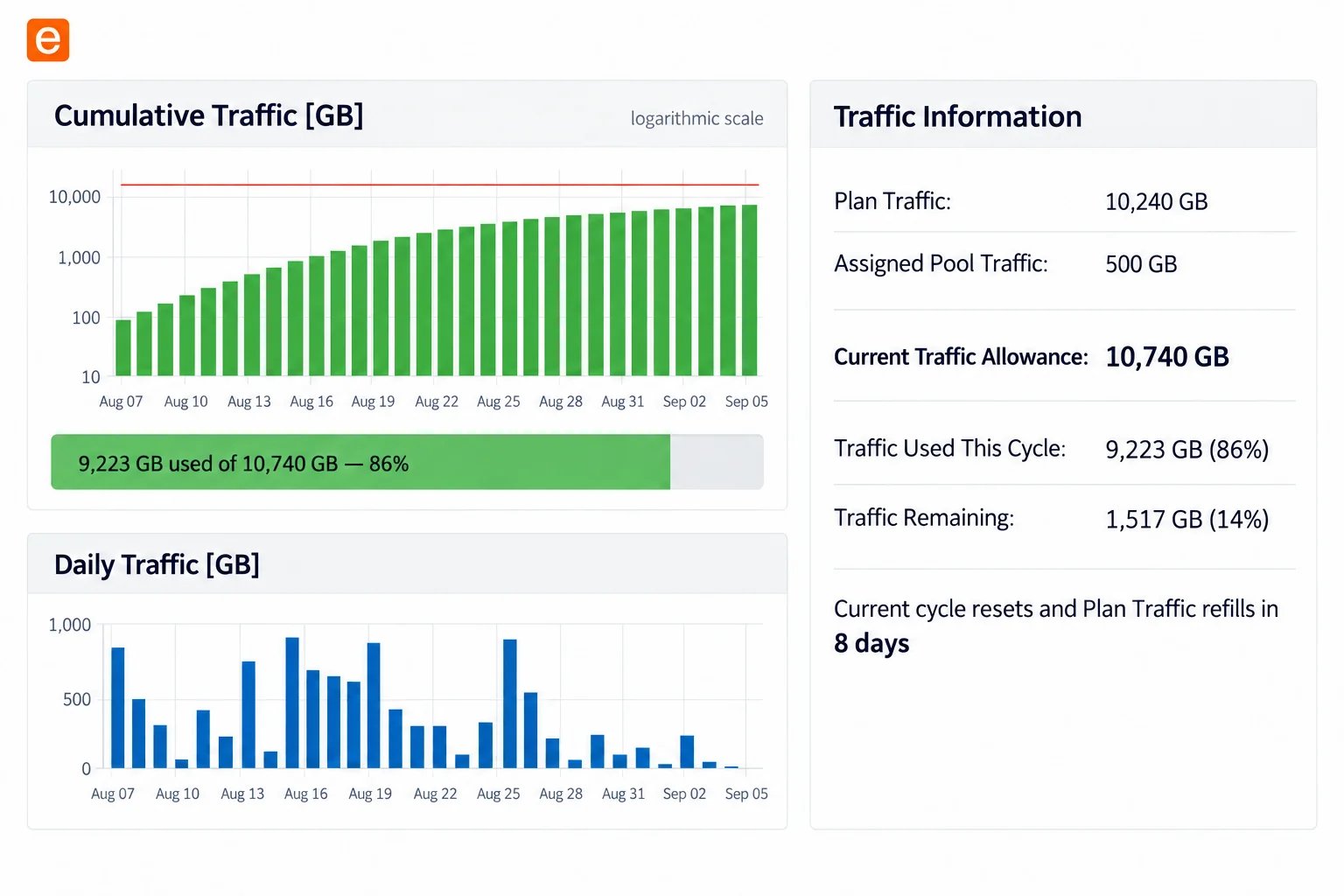
Current Traffic Allowance = Plan Traffic + Assigned Pool TrafficTraffic Remaining = Current Traffic Allowance - Traffic Used This Cycle
- Cumulative Traffic: Shows traffic consumed during the current cycle against the Current Traffic Allowance. The chart uses a logarithmic scale.
- Daily Traffic: Shows traffic consumption by day so you can identify usage patterns and spikes.
- Plan Traffic: The traffic supplied with the VPS for each monthly cycle.
- Assigned Pool Traffic: Additional Pool Traffic assigned to this VPS for the current cycle.
- Current Traffic Allowance: Plan Traffic plus Assigned Pool Traffic for the current cycle.
- Traffic Used This Cycle: Traffic consumed since the most recent monthly refill, shown in GB and as a percentage of the Current Traffic Allowance.
- Traffic Remaining: The amount and percentage that can still be consumed before the Current Traffic Allowance is exhausted.
- Current cycle resets and Plan Traffic refills: The countdown shows when the current usage cycle will reset and the VPS will receive its next Plan Traffic allowance.
Traffic Pool assignment controls
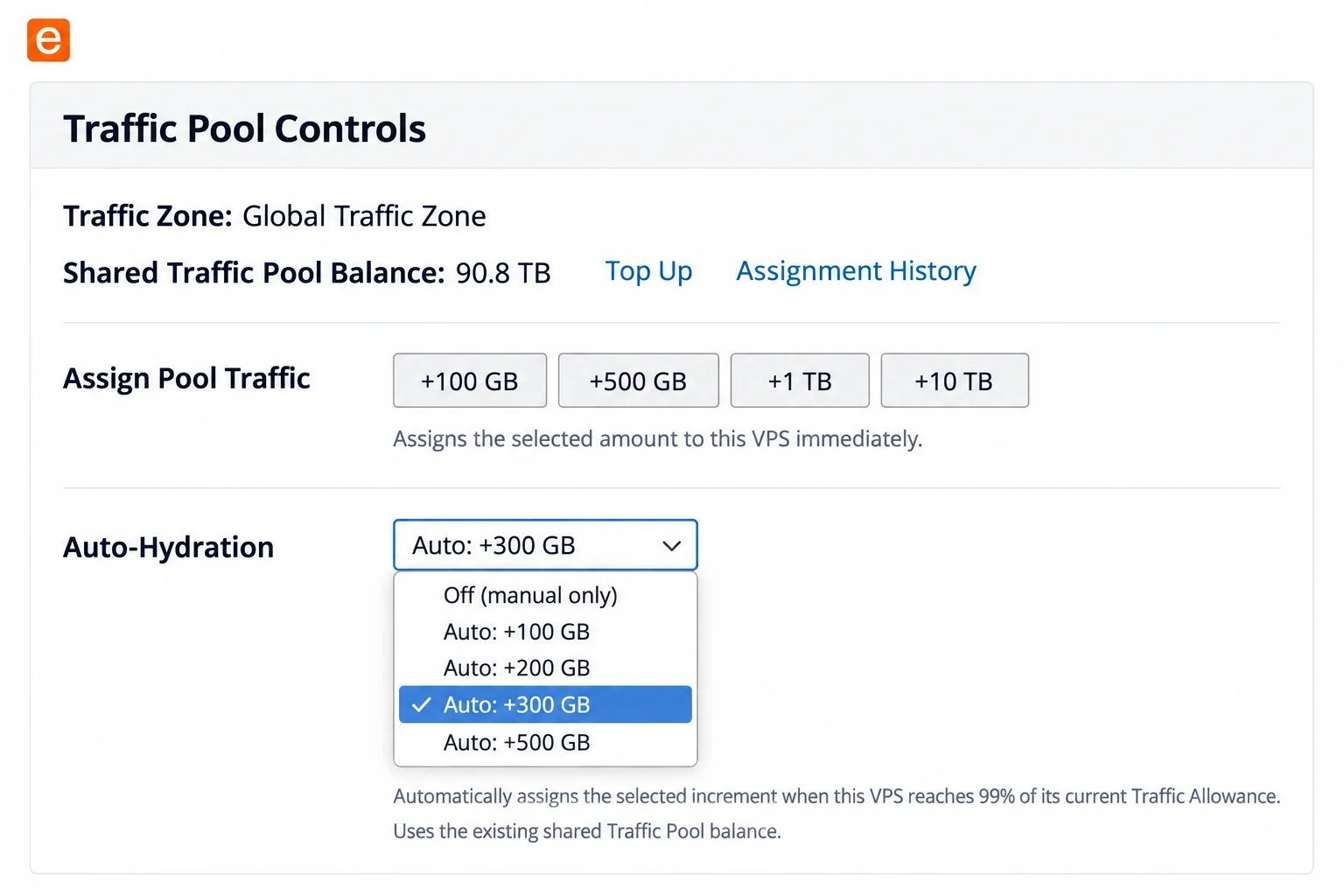
- Traffic Zone: The pricing zone that applies to Pool Traffic. EDIS Global uses one Global Traffic Zone across all locations.
- Shared Traffic Pool Balance: Unassigned Pool Traffic currently available across your account.
- Top Up: Opens the Traffic Pool purchase page.
- Assignment History: Shows manual and automatic Pool Traffic assignments. Click pool log in that window to open the account-wide accounting balance sheet.
- Assign Pool Traffic: Provides +100 GB, +500 GB, +1 TB, and +10 TB quick-assignment buttons.
- Auto-Hydration: Provides selectable 100 GB, 200 GB, 300 GB, and 500 GB increments and is configured separately for every VPS.
Traffic Pool accounting balance sheet
The balance sheet records every Traffic Pool transaction chronologically, including purchases, complimentary starter credits, manual or automatic assignments to VPS services, and the resulting Pool balance.How to access the balance sheet
You can open the account-wide Traffic Pool balance sheet from any VPS in your account.- Log in to the VPS Management Portal, open Services → My Services, and select any VPS.
- On the Server Information tab, scroll to Traffic Information. Click Assignment History beside or below Shared Traffic Pool Balance.
- In the Assignment History window, click the blue pool log button below the transaction list.
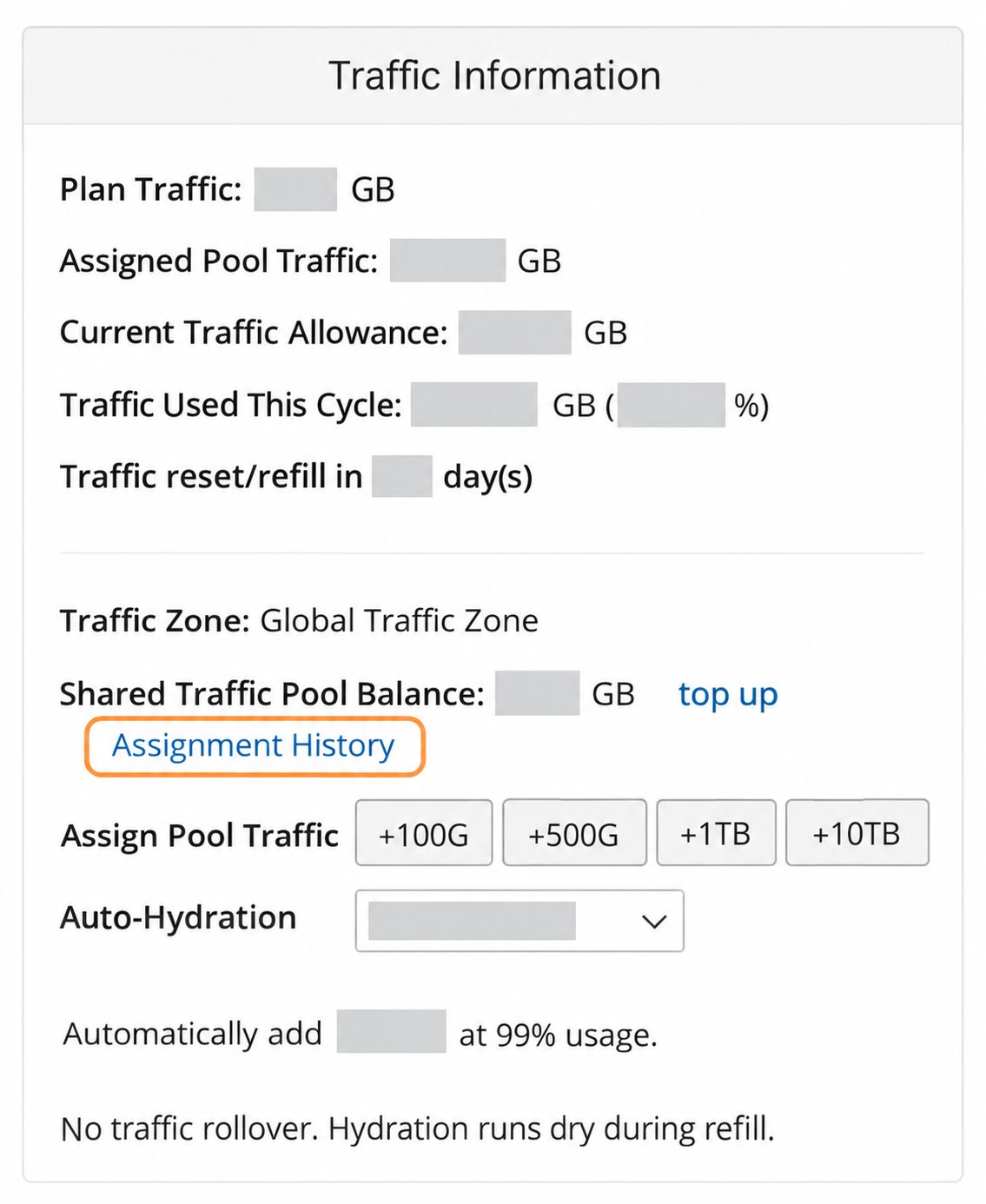
Step 2: In Traffic Information, click Assignment History. Customer usage and balances are hidden.
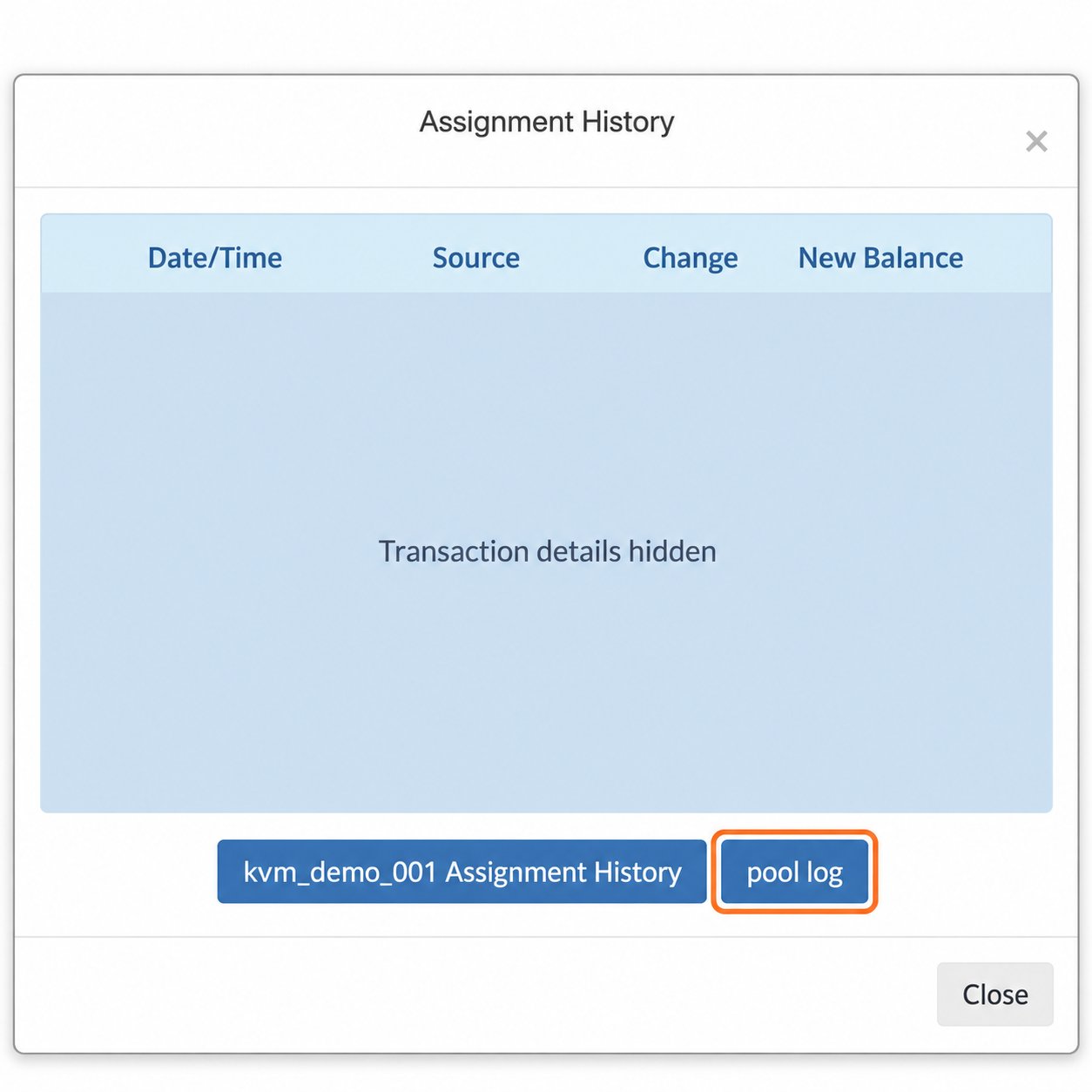
Step 3: Click pool log below the transaction list. Transaction details are hidden and the VPS ID is fictional.
Viewing Assignment History or pool log does not assign traffic, purchase traffic, or change Auto-Hydration settings.
How to read the balance sheet
- Date/Time: When the transaction occurred.
- Source: What caused the transaction, such as a purchase, starter credit, or assignment to a VPS.
- Change: The amount added to (
+) or deducted from (-) the Pool. - New Balance: The Pool balance after the transaction.
Email notification when 20% or less remains
After each Traffic Pool top-up, the resulting Pool balance becomes the reference balance for the low-balance notification. When 80% or more of that reference balance has been assigned, EDIS Global sends an email indicating that 20% or less remains. Because traffic is assigned in fixed increments, the balance may already be below exactly 20%, or even at 0 GB, when EDIS Global sends the notification. The email indicates that the low-balance threshold has been crossed.A low or empty Pool balance does not affect a VPS that still has available assigned traffic. It means that manual assignment and Auto-Hydration cannot provide further traffic until the Pool is topped up.
Which option should you choose?
Use the VPS Traffic Calculator to compare Pool Traffic with a plan upgrade using current prices for your location, expected usage, existing Pool balance and days until refill. Compare an occasional spike separately from recurring monthly demand.Traffic Limit & Restoration
Learn what happens when a VPS reaches its traffic limit and how to restore full speed.
Upgrade Your VPS Plan
Compare a higher plan when increased traffic usage is recurring.