

Overview
ping.pe is a public tool that provides an overview of ping and packet loss measurements from multiple locations worldwide. Ping.pe can help determine whether an IP address or hostname is reachable and whether packet loss may be present. ping.pe runs its probes on third-party (VPS-) infrastructure. As a result, measurements are not fail-safe:- Probe nodes may be temporarily unstable
- Some providers block traffic from other providers
- Individual probe locations may show misleading results
Running a ping.pe Test
- Open https://ping.pe
- Enter the IP address or hostname you want to test
- Start the test and allow it to run for at least 30 seconds
Reviewing Packet Loss Using MTR
When packet loss is suspected, do not rely on ping results alone.Always review the MTR output.
- Let the test run for at least 30 seconds
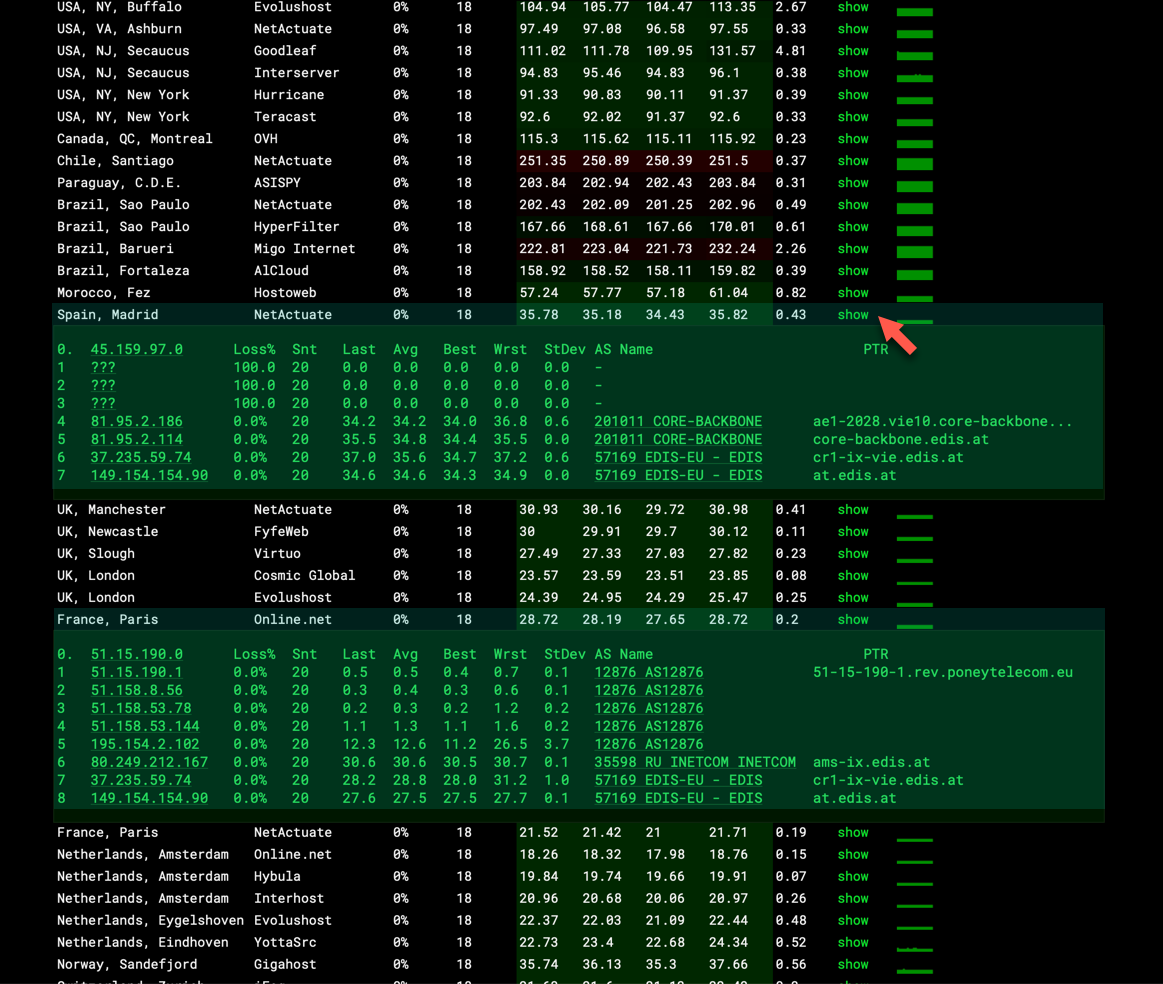
- Click the green “show” button in the MTR column
(second column from the right) - The MTR results will expand below the table
- Whether packet loss is present
- At which hop packet loss begins
- Whether the issue is upstream, transit-related, or destination-related
Sharing ping.pe Results
At the bottom of the ping.pe page, click “Save as image”. This generates an image of the output you currently see.You can share the generated image link with EDIS Global support, allowing us to review exactly what you measured.
Important Notes
- ping.pe results are indicative, not authoritative
- Single failing probe locations do not necessarily indicate a real issue
- Packet loss analysis should always include MTR data