> ## Documentation Index
> Fetch the complete documentation index at: https://docs.edisglobal.com/llms.txt
> Use this file to discover all available pages before exploring further.
# EDIS Global VPS Management Portal features and tools
> Manage your EDIS Global VPS from the VPS Management Portal: power-cycle, run auto-installers, upload ISOs, configure rDNS, use noVNC, monitor traffic, and more.
## **Overview VPS Management Portal**
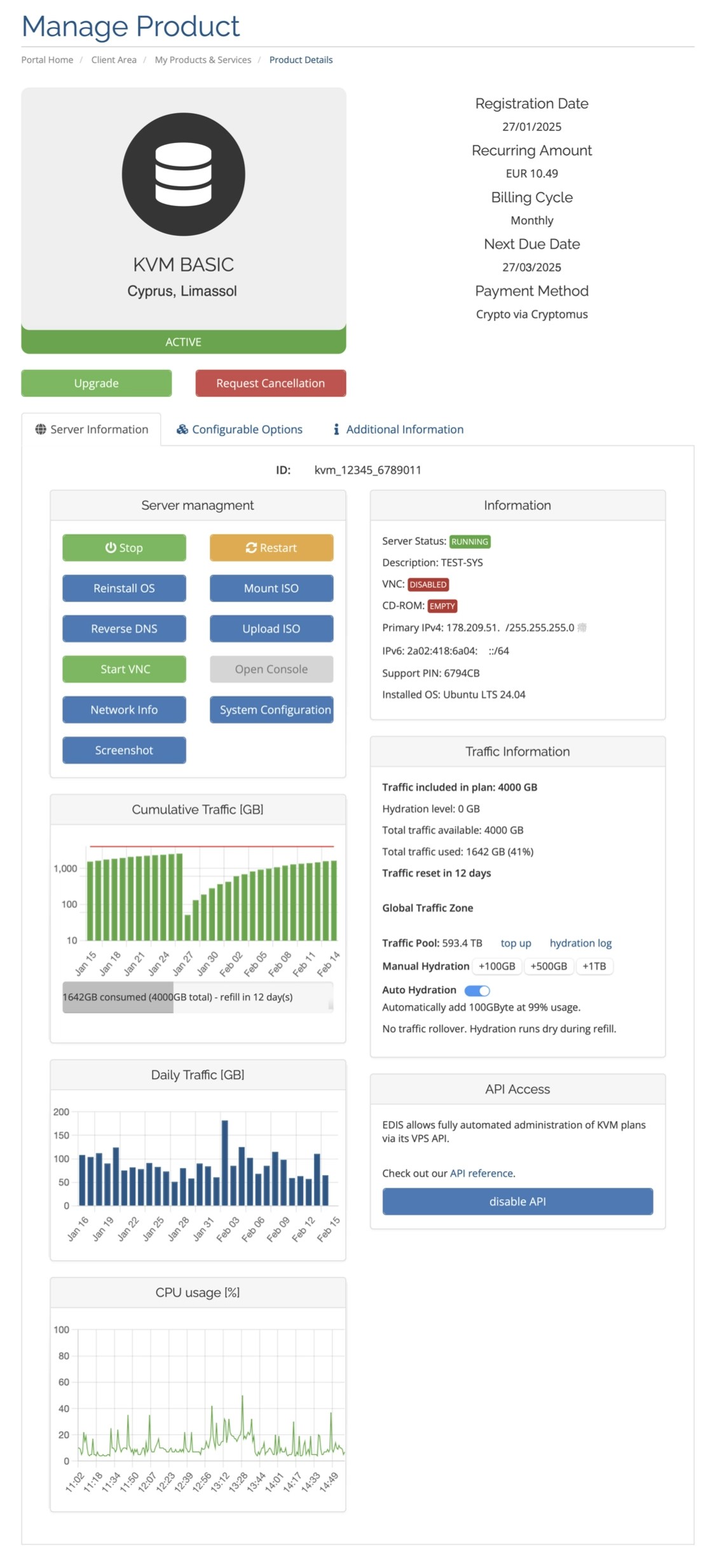
Here is a short list of available features of our
VPS Management Portal
.
* [Power Cycle](./power-cycle-or-reboot-a-vps) Start / Stop / Restart your service
* [1-Click Installation](./autoinstall-reinstall-install-vps-linux-windows) of common Linux distributions CentOS 9, CentOS 8, CentOS 7, Debian 13 (trixie), Debian 12 (Bookworm), Debian 11 (Bullseye), Ubuntu 24.04, Ubuntu 22.04, Ubuntu 18.04, Ubuntu 16.04
* [1-Click Installation](./autoinstall-reinstall-install-vps-linux-windows) of Windows Server 2025, 2022, 2019 (180-days trial), and Windows 10 / 11 (90-days trial)
* [Upload your own ISO](./bring-your-own-iso) (we are cloud-init ready), or mount provided OS ISOs
* [Reverse DNS](../faq/ip-addresses/setting-up-reverse-pointers) PTR record delegation for IPv4 and IPv6
* [VNC Server](./enable-vnc-server) Access your VPS with a desktop VNC client
* [Console](./enable-vnc-server#novnc-console-instructions) Access your VPS through the provided web-based noVNC Console
* Screenshot: Pull a live screenshot from your server (without launching VNC)
* [System Configuration](./system-configuration-dialog) Customize important hardware emulation settings (ethernet, display, boot timeout, cores vs sockets, vlan)
* [Post-Install Scripts](./post-install-scripts) (automate your deployment)
* CPU statistics, Traffic statistics
* [Detailed Traffic Information](../faq/traffic-bandwidth/traffic-stats-refill-explained) Plan traffic, used traffic, traffic refill/reset days
* [Traffic Pool](../faq/traffic-bandwidth/traffic-pool) Traffic Zone, Traffic Pool Size, Manual Hydration Buttons, Toggle Auto Hydration, Hydration Log per VPS and Traffic Pool balance sheet for your entire account.
* [Order API](https://docs.edisglobal.com/order-api-reference/order-api-welcome) Automate the entire product lifecycle, including configuration, ordering and cancellations.
* [Management API](https://docs.edisglobal.com/management-api-reference/authentication/create-auth-session) Automate and remote-control every technical aspect of your VPS hosting plans.
* Your servers [Support PIN](./your-support-pin)