> ## Documentation Index
> Fetch the complete documentation index at: https://docs.edisglobal.com/llms.txt
> Use this file to discover all available pages before exploring further.
# Upgrade to a Higher VPS Plan
> Upgrade your VPS to a higher plan with more RAM, additional vCPU cores, larger disk space, and increased monthly traffic commitment without losing data.
export const CtaButton = ({label, link, openInNewTab}) => ;
## 🚀 How to upgrade your VPS to a higher tier
You can upgrade your VPS plan (e.g. from **KVM SMART** to **KVM STARTER**) anytime directly through the VPS Management Portal.
***
## 🔄 What is a VPS Plan Upgrade?
A plan upgrade means moving your VPS to a **larger, predefined plan** with more resources like:
* More RAM
* More vCPU cores
* More traffic commitment
No need to reinstall or migrate! The upgrade happens in-place.
***
## 💶 How is it billed?
You only pay the **price difference** between the two plans, **prorated for the rest of the billing period**.\
You don’t pay the full price of the new plan — just the upgrade difference (you don't pay twice)
***
## 🛠️ How to order a Plan Upgrade
1. Log in to your [VPS Management Portal](https://manage.edisglobal.com/clientarea.php)
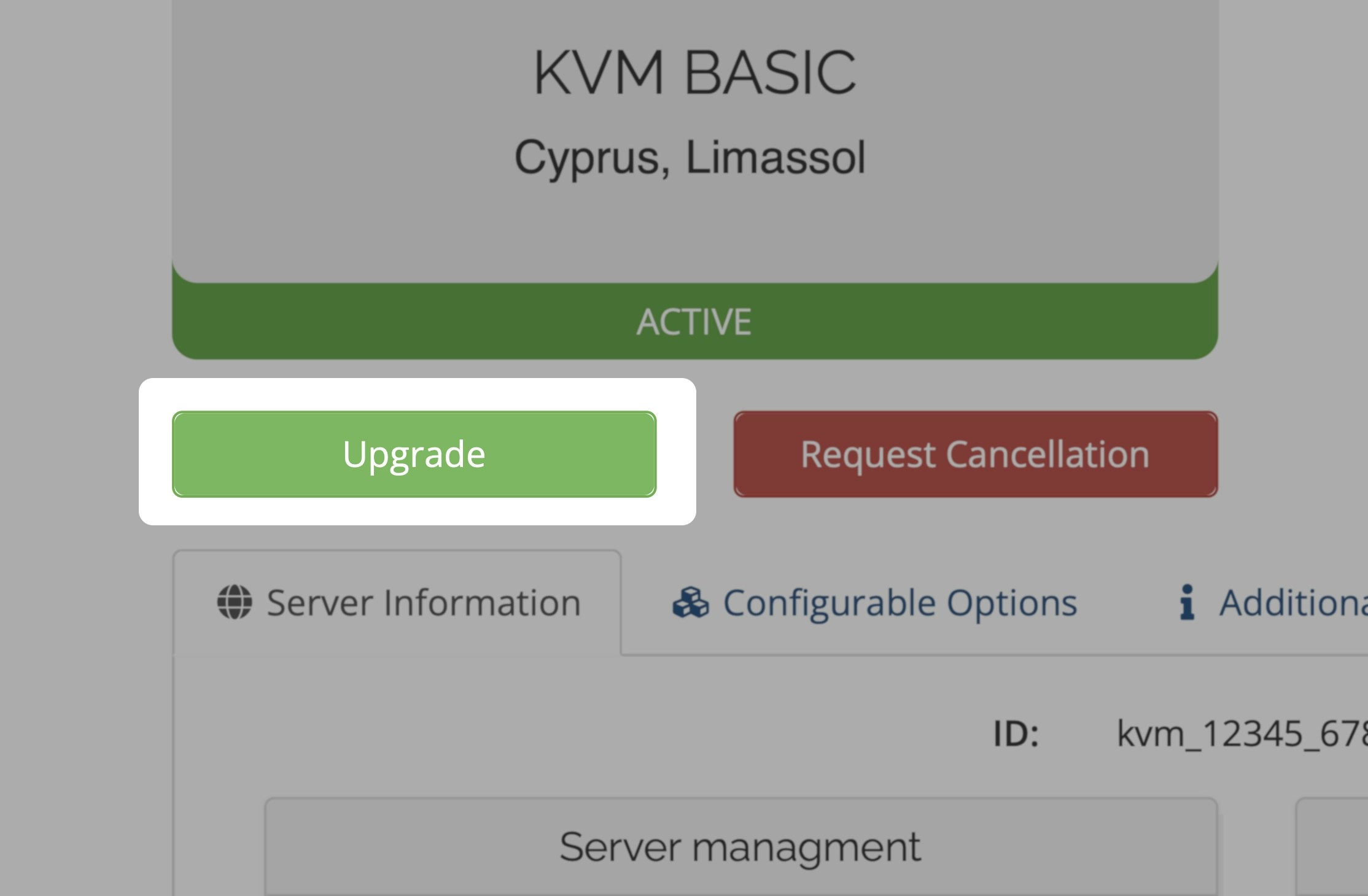
2. Find your VPS in the **Services** tab
3. Click the **“Upgrade”** button
4. Select the higher plan, confirm, and pay the invoice
5. Within 7 minutes after payment confirmation, the upgrade is processed and you’ll receive an email with instructions
***
## ⚙️ What happens next?
* **No IP change** or reinstall required
* **Traffic upgrade** is available immediately
* **RAM and vCPU** become active after a **cold reboot**
* **Disk remains untouched** – you choose whether to resize your filesystem
***
## Need more traffic than our plans offer?
If you are already on the largest tier, and you're running out of available traffic, you can purchase traffic. EDIS Global offers the possibility to maintain a traffic pool. A traffic pool allows you to manually assign traffic to your VPS, or enable auto-hydration and automatic refill at 99% usage levels. **Just one simple global price across all 50 EDIS locations.**
 ## 🚀 How to upgrade your VPS to a higher tier
You can upgrade your VPS plan (e.g. from **KVM SMART** to **KVM STARTER**) anytime directly through the VPS Management Portal.
***
## 🔄 What is a VPS Plan Upgrade?
A plan upgrade means moving your VPS to a **larger, predefined plan** with more resources like:
* More RAM
* More vCPU cores
* More traffic commitment
No need to reinstall or migrate! The upgrade happens in-place.
***
## 💶 How is it billed?
You only pay the **price difference** between the two plans, **prorated for the rest of the billing period**.\
You don’t pay the full price of the new plan — just the upgrade difference (you don't pay twice)
***
## 🛠️ How to order a Plan Upgrade
1. Log in to your [VPS Management Portal](https://manage.edisglobal.com/clientarea.php)
2. Find your VPS in the **Services** tab
3. Click the **“Upgrade”** button
4. Select the higher plan, confirm, and pay the invoice
5. Within 7 minutes after payment confirmation, the upgrade is processed and you’ll receive an email with instructions
***
## ⚙️ What happens next?
* **No IP change** or reinstall required
* **Traffic upgrade** is available immediately
* **RAM and vCPU** become active after a **cold reboot**
* **Disk remains untouched** – you choose whether to resize your filesystem
***
## 🚀 How to upgrade your VPS to a higher tier
You can upgrade your VPS plan (e.g. from **KVM SMART** to **KVM STARTER**) anytime directly through the VPS Management Portal.
***
## 🔄 What is a VPS Plan Upgrade?
A plan upgrade means moving your VPS to a **larger, predefined plan** with more resources like:
* More RAM
* More vCPU cores
* More traffic commitment
No need to reinstall or migrate! The upgrade happens in-place.
***
## 💶 How is it billed?
You only pay the **price difference** between the two plans, **prorated for the rest of the billing period**.\
You don’t pay the full price of the new plan — just the upgrade difference (you don't pay twice)
***
## 🛠️ How to order a Plan Upgrade
1. Log in to your [VPS Management Portal](https://manage.edisglobal.com/clientarea.php)
2. Find your VPS in the **Services** tab
3. Click the **“Upgrade”** button
4. Select the higher plan, confirm, and pay the invoice
5. Within 7 minutes after payment confirmation, the upgrade is processed and you’ll receive an email with instructions
***
## ⚙️ What happens next?
* **No IP change** or reinstall required
* **Traffic upgrade** is available immediately
* **RAM and vCPU** become active after a **cold reboot**
* **Disk remains untouched** – you choose whether to resize your filesystem
***