> ## Documentation Index
> Fetch the complete documentation index at: https://docs.edisglobal.com/llms.txt
> Use this file to discover all available pages before exploring further.
# Traffic Pool: hydrate VPS traffic and premium zones
> Learn how the EDIS Global Traffic Pool works: refill or hydrate VPS traffic on demand, use free starter credit, and understand premium traffic zones.
export const CtaButton = ({label, link, openInNewTab}) => ;
## **One Traffic Pool. One Global Price.**
Running out of traffic can be a hassle. At EDIS Global, our traffic pool feature allows you to easily ‘hydrate’ your VPS with additional traffic as needed. With just a few clicks, allocate traffic from your traffic pool and keep your server online without interruptions.
**No more traffic zones. Just one global price for all 50 EDIS locations.**
***
### Why you'll love your traffic pool
✅ You are in complete control of the process of allocating and managing traffic.
✅ Maintain optimal functioning for your services.
✅ Take advantage of lowest price traffic rates (starting from EUR 6 /TB)
✅ Traffic in the pool never expires.
✅ Manually assign traffic to any KVM in your account which is running low on traffic.
✅ Automatic refill option individually configurable for every VPS ("Auto Hydration")
✅ One global price
***
## Traffic pool starter credit
Starting **November 19, 2025**, every newly purchased VPS includes **100 GB of complimentary traffic**. EDIS Global automatically adds **+100 GB** to your Traffic Pool account for each new VPS you order. This starter credit lets you explore how the Traffic Pool works — and gives you a safety buffer if you ever run low on traffic.
Your 100 GB starter credit:
* **never expires**
* **can be assigned to any VPS** in your account
* works with both **manual-** and **Auto-Hydration**
***
## How to Get Started with the EDIS Traffic Pool
### 🛒 Purchase Traffic
[Buy traffic](https://www.edisglobal.com/buy-traffic) - You can choose the amount of traffic you want to buy (from 1TB to 10PB)
### 📌 Assign Traffic
Once payment is complete, head to the **Traffic Information Window** in your server’s management page and **assign traffic** to your service. Use +100GB, +500GB, +1TB, +10TB buttons for manual hydration.
### ⚙️ Enable Auto-Hydration
Enable Auto-Hydration for automatic traffic assignment to your VPS when usage hits 99%.
***
## Traffic pool in the traffic information window
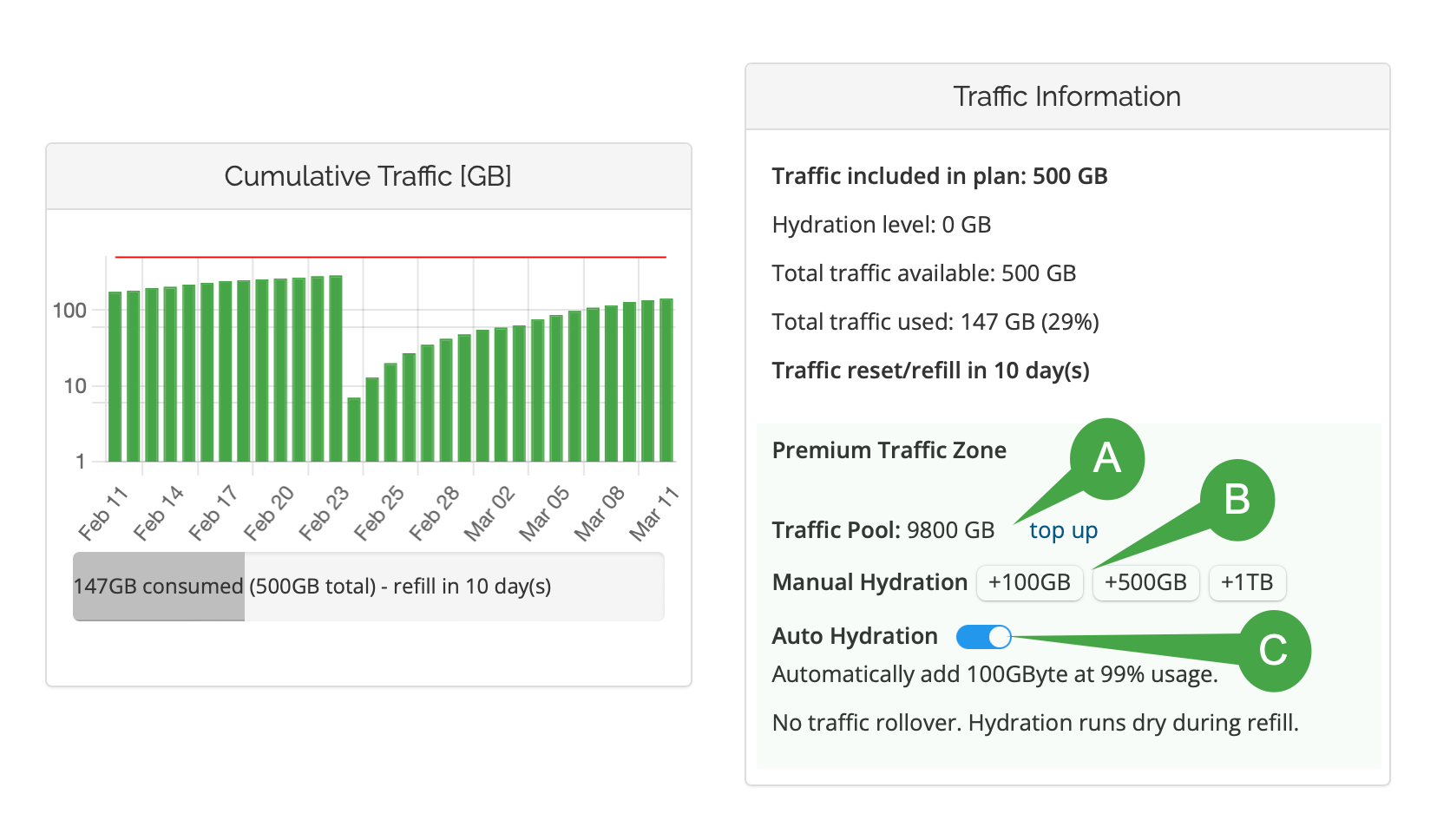
In the Traffic Information window, you can monitor and manage your traffic pool allocation. This section provides a snapshot of your current traffic usage and remaining balance, with options for manual or automatic top-ups to ensure uninterrupted service.
### Infographic Key
**A. Traffic Pool Size & Top-Up Link:** Shows your current pool balance, with a “top up” option to add traffic when needed.
**B. Manual Hydration:** Manually allocate +100GB, +500GB, or +1TB to your VPS as required.
**C. Auto Hydration:**
**Automatically top up your traffic pool with 100GB, 200GB, 300GB, or 500GB** when usage reaches 99%, ensuring uninterrupted service. Auto top-up can be enabled or disabled at any time. You can configure the top-up size individually for each VPS through the management portal or API.
**For custom monitoring,** use our **\_callback feature\_** via the Management REST API
to trigger notifications when traffic reaches a defined threshold.
***
## Traffic pool accounting balance sheet
The balance sheet below (demo data) works like a bank account statement. We log **traffic top-ups**, **pool** **traffic consumption**, and the resulting balance after each transaction. This report provides a transparent overview of **pool** **traffic usage across your entire VPS hosting account**.
**How to Read the Balance Sheet**
• **Date/Time:** Timestamp of the transaction.\
• **Source:** The VPS instance consuming traffic, or a Traffic Pool Top-Up\
• **Change:** Shows the amount of traffic deducted (negative) or added (positive).\
• **New Balance:** The updated traffic balance after the transaction.
| Date/Time | Source | Change | New Balance |
| ------------------- | -------------------------------------------------------- | ------------- | ----------- |
| 2025-03-17 16:52:12 | kvm\_demo\_id002 | -100 GB | 6000 GB |
| 2025-03-17 14:12:12 | kvm\_demo\_id002 | -100 GB | 6700 GB |
| 2025-03-17 12:22:32 | **Traffic Pool Starter Credit (100GB) kvm\_demo\_id003** | **+100 GB** | 6800 GB |
| 2025-03-17 12:22:32 | kvm\_demo\_id002 | -1000 GB | 6700 GB |
| 2025-03-16 10:02:30 | kvm\_demo\_id002 | -500 GB | 7700 GB |
| 2025-03-16 10:01:45 | kvm\_demo\_id004 | -300 GB | 8200 GB |
| 2025-03-16 09:59:10 | **Traffic Pool Top-Up** | **+1000 GB** | 8500 GB |
| 2025-03-16 08:45:15 | kvm\_demo\_id001 | -1000 GB | 7500 GB |
| 2025-03-15 23:15:35 | kvm\_demo\_id001 | -1000 GB | 8500 GB |
| 2025-03-15 22:12:20 | kvm\_demo\_id003 | -500 GB | 9500 GB |
| 2025-03-10 09:59:10 | **Traffic Pool Top-Up** | **+10000 GB** | 10000 GB |
***
### **Email notification at 20% pool traffic remaining**
We’ve implemented an automatic email notification to help you stay ahead of traffic exhaustion. After each top-up, your traffic pool is considered 100% full.
Once **80% of that traffic has been assigned**, you will receive an email letting you know that **only 20% remains**. This early alert gives you time to top up your pool and avoid service interruptions.
***
## Need more traffic? 🚀
Click below to explore your options to keep your VPS running smoothly:
## **One Traffic Pool. One Global Price.**
**No more traffic zones. Just one global price for all 50 EDIS locations.**
***
✅ One global price
## **One Traffic Pool. One Global Price.**
**No more traffic zones. Just one global price for all 50 EDIS locations.**
***
✅ One global price
## **One Traffic Pool. One Global Price.**
**No more traffic zones. Just one global price for all 50 EDIS locations.**
***
✅ One global price
## **One Traffic Pool. One Global Price.**
**No more traffic zones. Just one global price for all 50 EDIS locations.**
***
✅ One global price
 ### Infographic Key
**A. Traffic Pool Size & Top-Up Link:** Shows your current pool balance, with a “top up” option to add traffic when needed.
**B. Manual Hydration:** Manually allocate +100GB, +500GB, or +1TB to your VPS as required.
**C. Auto Hydration:**
**Automatically top up your traffic pool with 100GB, 200GB, 300GB, or 500GB** when usage reaches 99%, ensuring uninterrupted service. Auto top-up can be enabled or disabled at any time. You can configure the top-up size individually for each VPS through the management portal or API.
**For custom monitoring,** use our **\_callback feature\_** via the Management REST API
### Infographic Key
**A. Traffic Pool Size & Top-Up Link:** Shows your current pool balance, with a “top up” option to add traffic when needed.
**B. Manual Hydration:** Manually allocate +100GB, +500GB, or +1TB to your VPS as required.
**C. Auto Hydration:**
**Automatically top up your traffic pool with 100GB, 200GB, 300GB, or 500GB** when usage reaches 99%, ensuring uninterrupted service. Auto top-up can be enabled or disabled at any time. You can configure the top-up size individually for each VPS through the management portal or API.
**For custom monitoring,** use our **\_callback feature\_** via the Management REST API