> ## Documentation Index
> Fetch the complete documentation index at: https://docs.edisglobal.com/llms.txt
> Use this file to discover all available pages before exploring further.
# Change IP Address
> How to change your VPS IP address. EDIS Global offers a free change within 24 hours of purchase; after that period a small service fee applies per IP.
export const CtaButton = ({label, link, openInNewTab}) => ;
## How to change your IP address
### Free IP change (within 24 hours)
You’re eligible for one **free IP change** if requested within the first 24 hours of your VPS purchase.
**Steps:**
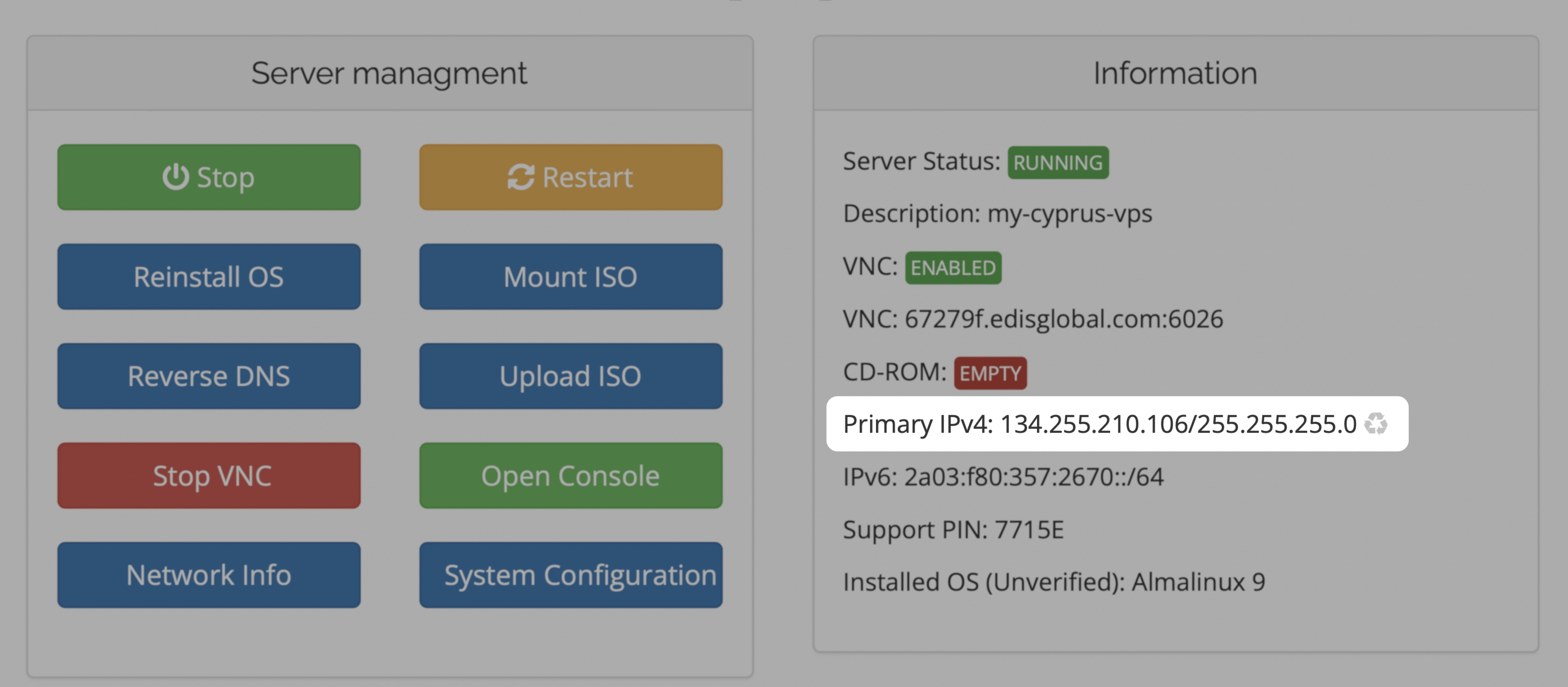
1. Log in to your EDIS Global [dashboard](https://manage.edisglobal.com/clientarea.php).
2. Navigate to **Services** and locate your VPS.
3. Click the ♻️ recycle icon next to your current IP to request the change.
> **Note:** After the IP change, you will need to **reinstall your system or manually configure** the new IP using VNC. Once the new IP is activated, your old IP stops working immediately.
> **Please note:** The free IP change applies only to your primary IPv4 address. If you need to change any additional IPv4 addresses, you can do so using our paid **Standard** or **Bespoke IP Change** services.
## IP change after 24 hours (paid options)
If more than 24 hours have passed, IP changes incur a fee. You have two options:
| Option | Price | Description |
| ---------------------- | ------- | ----------------------------------------------------------------- |
| **Standard IP Change** | **€5** | A new IP is automatically assigned (random subnet; no selection). |
| **Bespoke IP Change** | **€10** | You choose an IP from a provided list of available addresses. |
### Standard IP change
After payment, the system assigns a random IP from a /24 subnet. You cannot influence the subnet selection.
> **Note:** “Random” means you cannot pick the subnet or guarantee its prefix.
### Bespoke IP change
You will receive a list of available IPs (from varying prefixes) and can choose one.
> **Note:** If you previously had an IP and it’s still unassigned, you may see it in this list.
***
## Configure new IP after change (for ALL cases)
> **Important:** Once the new IP is assigned, the **old IP immediately stops working**. You must activate the new IP by either:
>
> • **Reinstalling your VPS**, or • **Manually configuring** it using VNC
***
## Summary & Recommendations
* If within 24 hours → use the **free IP change**.
* After 24 hours → choose **Standard** or **Bespoke**.
* **Always** follow up by reinstalling or configuring your new IP (see above).
 > **Please note:** The free IP change applies only to your primary IPv4 address. If you need to change any additional IPv4 addresses, you can do so using our paid **Standard** or **Bespoke IP Change** services.
## IP change after 24 hours (paid options)
If more than 24 hours have passed, IP changes incur a fee. You have two options:
| Option | Price | Description |
| ---------------------- | ------- | ----------------------------------------------------------------- |
| **Standard IP Change** | **€5** | A new IP is automatically assigned (random subnet; no selection). |
| **Bespoke IP Change** | **€10** | You choose an IP from a provided list of available addresses. |
### Standard IP change
After payment, the system assigns a random IP from a /24 subnet. You cannot influence the subnet selection.
> **Note:** “Random” means you cannot pick the subnet or guarantee its prefix.
> **Please note:** The free IP change applies only to your primary IPv4 address. If you need to change any additional IPv4 addresses, you can do so using our paid **Standard** or **Bespoke IP Change** services.
## IP change after 24 hours (paid options)
If more than 24 hours have passed, IP changes incur a fee. You have two options:
| Option | Price | Description |
| ---------------------- | ------- | ----------------------------------------------------------------- |
| **Standard IP Change** | **€5** | A new IP is automatically assigned (random subnet; no selection). |
| **Bespoke IP Change** | **€10** | You choose an IP from a provided list of available addresses. |
### Standard IP change
After payment, the system assigns a random IP from a /24 subnet. You cannot influence the subnet selection.
> **Note:** “Random” means you cannot pick the subnet or guarantee its prefix.