> ## Documentation Index
> Fetch the complete documentation index at: https://docs.edisglobal.com/llms.txt
> Use this file to discover all available pages before exploring further.
# How VPS Renewals Work
> Understand how EDIS Global VPS renewals work: auto-renewal, when invoices are sent, automatic payments, and how to renew a VPS instantly from the portal.
## The short version
* Your VPS **renews automatically** unless you cancel it in the portal.
* If you don't need a service anymore, **cancel it before the next invoice is created**.
* Auto-renewal keeps your VPS running without interruption.
Auto-renewal is intentional. It protects your service, your data, and your uptime.
***
## When we send invoices
We create a **Pro-Forma invoice 7 days before the due date** of your service.
A Pro-Forma invoice is like an offer:
* If you pay it, your service renews and we issue a fully compliant tax invoice.
* If you don't pay it, we send payment reminders. If it stays unpaid, the service is suspended, then terminated, and all data is wiped.
See the full timeline: [VPS Billing Workflow](/faq/billing-lifecycle/automated-vps-billing-workflow) and [Data Retention Policy](/faq/billing-lifecycle/data-retention-period#data-retention-policy-at-edis-global).
***
## Renew instantly from the portal
Don't want to wait? You can renew a service any time.
In your client portal, open the service and click the blue **Create Invoice / Renew** button.
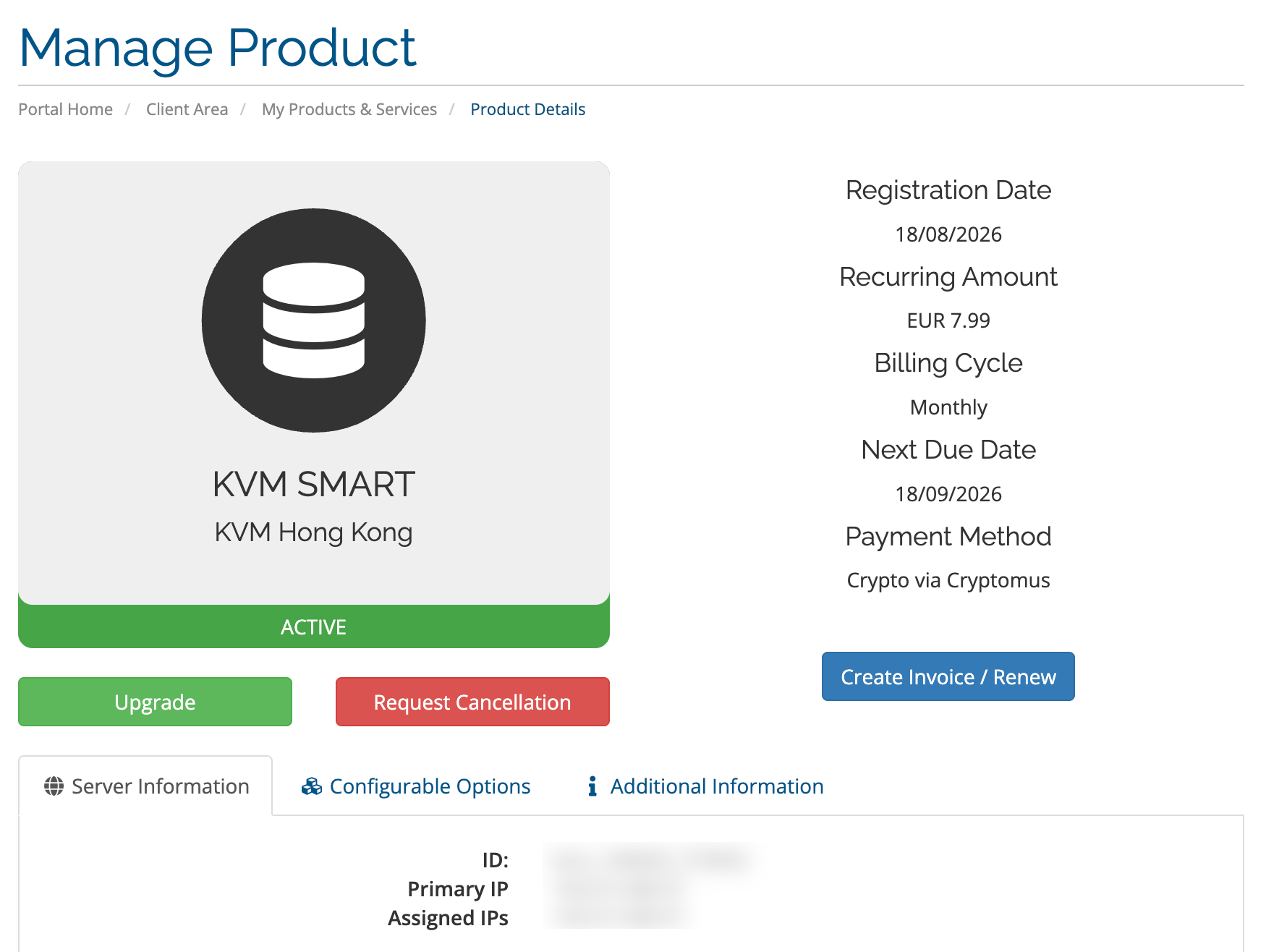 This lets you:
* Generate the renewal invoice immediately.
* Choose the billing cycle you want to renew for.
**Annual billing gives you one month free.** You pay for 11 months and get 12.
You can also contact our team to issue an upfront invoice for you.
***
## Automatic payments
If you have a **credit card on file** or **account credit**, renewal invoices are paid automatically.
| Payment method | When it's charged |
| ------------------- | -------------------------------------------------- |
| Credit card on file | Charged **4 days after** the invoice is sent |
| Account credit | Applied **immediately** when the invoice is issued |
When account credit is applied, your service renews right away.
Learn more:
* [Automated Payments](/faq/billing-lifecycle/automated-payments)
* [Pay Invoices from Credit Balance](/faq/billing-lifecycle/pay-invoices-from-credit-balance)
***
## For resellers: opt out of automatic credit application
If you work with account credit and don't want it applied to renewal invoices automatically, you can opt out.
See [Credit Manipulation](/faq/billing-lifecycle/scheduled-billing-window#-credit-manipulation).
***
## Accidentally renewed a service?
You can request to convert the payment into account credit. Terms and conditions apply.
See [Accidental Renewal: Convert Payment to Account Credit](/faq/billing-lifecycle/accidental-renewal-convert-payment-to-credit).
## Related topics
- [Product changelog](/changelog/product.md)
- [VPS Billing Workflow](/faq/billing-lifecycle/automated-vps-billing-workflow.md)
- [EDIS Global Partner Starter Pack](/documentation/misc/partner-starter-pack.md)
- [Accidental Renewal: Convert Payment to Account Credit](/faq/billing-lifecycle/accidental-renewal-convert-payment-to-credit.md)
- [Order a VPS with the EDIS Global API (Complete Guide)](/order-api-reference/order-api.md)
This lets you:
* Generate the renewal invoice immediately.
* Choose the billing cycle you want to renew for.
**Annual billing gives you one month free.** You pay for 11 months and get 12.
You can also contact our team to issue an upfront invoice for you.
***
## Automatic payments
If you have a **credit card on file** or **account credit**, renewal invoices are paid automatically.
| Payment method | When it's charged |
| ------------------- | -------------------------------------------------- |
| Credit card on file | Charged **4 days after** the invoice is sent |
| Account credit | Applied **immediately** when the invoice is issued |
When account credit is applied, your service renews right away.
Learn more:
* [Automated Payments](/faq/billing-lifecycle/automated-payments)
* [Pay Invoices from Credit Balance](/faq/billing-lifecycle/pay-invoices-from-credit-balance)
***
## For resellers: opt out of automatic credit application
If you work with account credit and don't want it applied to renewal invoices automatically, you can opt out.
See [Credit Manipulation](/faq/billing-lifecycle/scheduled-billing-window#-credit-manipulation).
***
## Accidentally renewed a service?
You can request to convert the payment into account credit. Terms and conditions apply.
See [Accidental Renewal: Convert Payment to Account Credit](/faq/billing-lifecycle/accidental-renewal-convert-payment-to-credit).
## Related topics
- [Product changelog](/changelog/product.md)
- [VPS Billing Workflow](/faq/billing-lifecycle/automated-vps-billing-workflow.md)
- [EDIS Global Partner Starter Pack](/documentation/misc/partner-starter-pack.md)
- [Accidental Renewal: Convert Payment to Account Credit](/faq/billing-lifecycle/accidental-renewal-convert-payment-to-credit.md)
- [Order a VPS with the EDIS Global API (Complete Guide)](/order-api-reference/order-api.md)